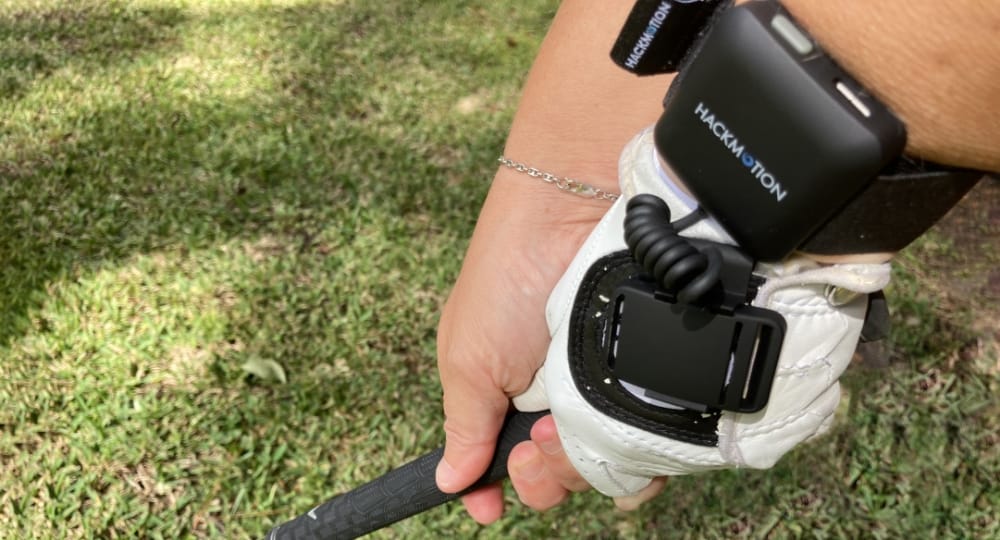
Our Hackmotion review tracks all the Hackmotion upgrades and why and who should consider getting one.
Quick Take
Hackmotion is more than a sensor that tracks precisely where and what your wrist and arm are doing during your swing.
It’s an intuitive and easy-to-use app and teaching platform that shows you what you’re doing wrong (and right), how to fix it, then takes you through the process of fixing it with instructional videos and guided drills.
All this is done in real time. No more guesswork.
Hackmotion can help you become a better golfer.
Editor’s Note: This review covers HackMotion through the current Sensor 4 release. Sensor 4 launched May 2026. Details on what’s new and whether to upgrade in the Sensor 4 section below.
Golfers who want to improve ball striking through better contact, control, and consistency — and who are ready to train with real-time feedback and specific swing fixes. Suitable for all handicap levels.
Considerations
Though there’s a model in most golfer’s price range, I think you need to be serious about improving your game to buy it.
Verdict
HackMotion is the most effective tool I’ve tested for improving swing mechanics, thus ball striking, through wrist motion training.
It’s intuitive, actionable, and worth it if you’re serious about your swing.
Where To Get Yours
Highly Recommended
HackMotion Swing Analyzer & Trainer
★★★★★★★★★★4.5
Pros
✓Intuitive & Easy to use
✓Immediately diagnoses faults & guides you through drills to fix them
We earn a commission if you make a purchase, at no additional cost to you.
We’ve been working with Hackmotion for a few years now.
It always had good bones, but the original app design and operation were overcomplicated and frustrating. Not so anymore.
Hackmotion went to school using customer feedback plus there own iterative process.
The result – the best wrist sensor on the market paired with an intuitive and functional app for a first class training experience.
Bottom line for 2026 readers: Sensor 3 was a significant upgrade over the prior model and WELL-WORTH upgrading. Or, buying for the first time.
Sensor 4 is a hardware refinement, not a reinvention.
If you don’t own one yet, get Sensor 4. If you own Sensor 3, keep your money.
Full reasoning below.
I’m a teaching pro & scratch golfer who has played golf for 30 years. I’m always looking to improve my game, even if it’s just a shot or two here and there. I love testing new strategies both on and off the course and studying golf swings to see what works.
I’ve had the HackMotion for about 6 months and have experimented with the best ways to practice and develop proper wrist action in the golf swing.
Jamie’s 2026 Update:
SENSOR 4 — WHAT’S CHANGED (AND WHAT HASN’T)
HackMotion was nice enough to send me a Sensor 4 unit to test.
I put it on the same way.
I calibrated the same way.
It had me hit 5 shots to assess my swing. (Same as prior version)
Then it found a fault – casting, in this instance – and immediately gave me drills to address it.
I performed the drills and checked process.
The Hackmotion app prompted me through all these steps.
So, operationally, it’s a Hackmotion and operates like I’m used to it operating.
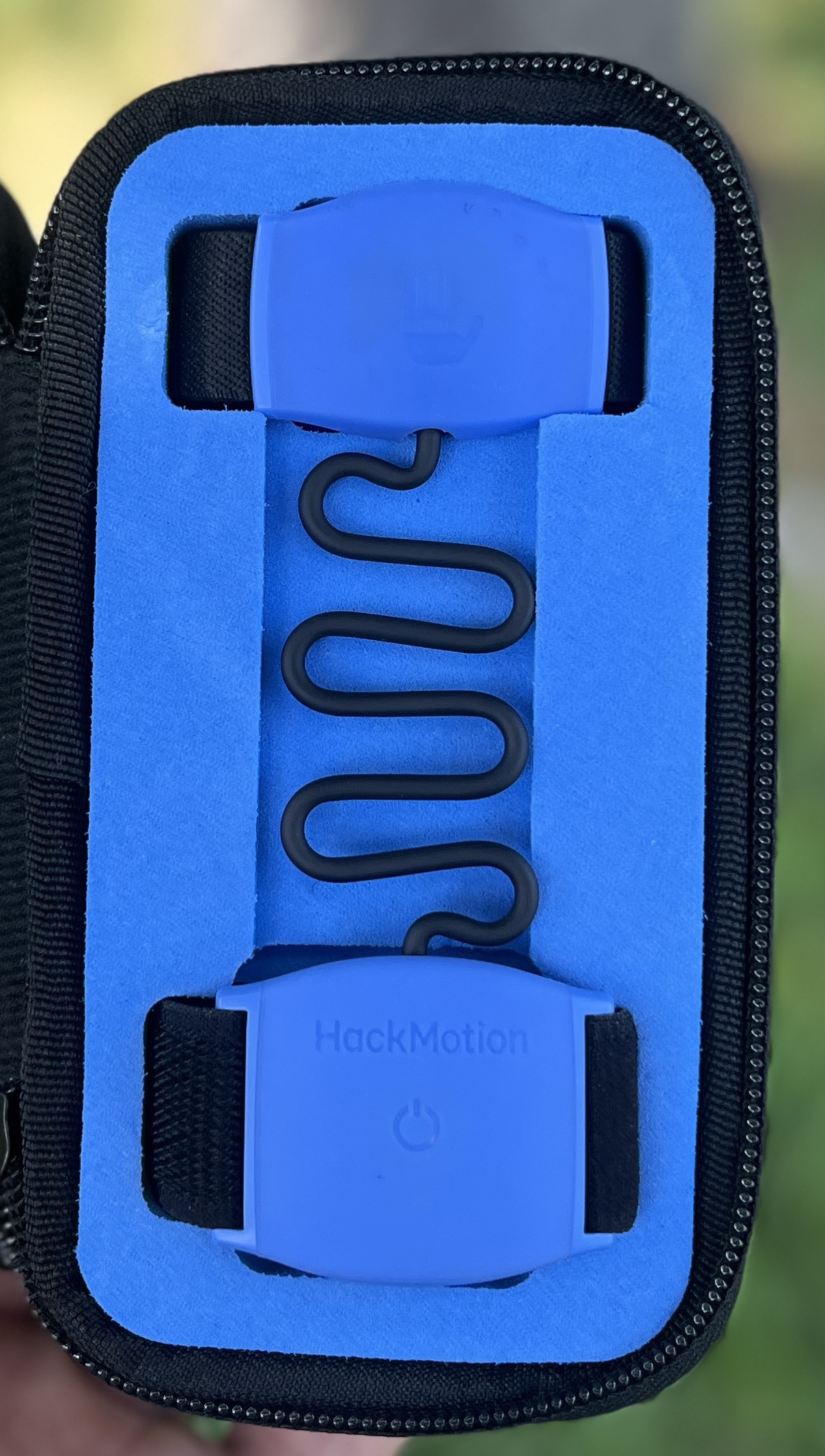
The sensor is slimmed down with the electronic parts housed in a soft rubber shell vs. hard plastic.
If you don’t own a HackMotion yet, Sensor 4 is the one to get. If you already own Sensor 3, keep your money.
Sensor 3 vs. Sensor 4 — The Spec Differences
Sensor 4 is ~25% smaller, soft rubber.
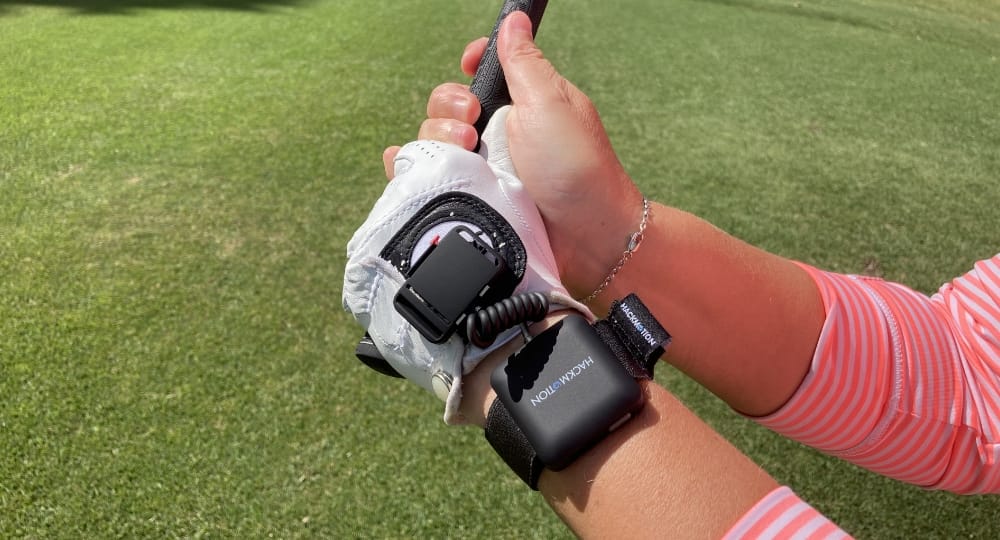
Sensor 4 is designed to wear under the glove. (Sensor 3 does too, I tried it)
Sensor 4 has three sizes (S, M, L).
Haptics: Sensor 3 uses a buzzer. Sensor 4 uses a linear haptic motor. (Different , but kind of the same)
Processor: 78 MHz on Sensor 3 vs. 150 MHz on Sensor 4.
RAM: 256 kB on Sensor 3 vs. 512 kB on Sensor 4.
Bluetooth: 5.3 on Sensor 3 vs. 6.0 on Sensor 4.
Weight: 23g on Sensor 3 vs. 26g on Sensor 4.
Battery / Charging: ~10 hrs / 2.5 hrs on both.
Color: Black on Sensor 3. Baby blue soft rubber on Sensor 4.
Sensor 4 hardware sleeker, softer, and fits under a glove (or over a glove). Operationally, it’s the same product.
Same calibration, same shot detection, same app, same drills, same results.
Under the glove. The medium strap fit me fine. First few swings I noticed the grip sitting across the sensor strap.
By swing four or five I forgot it was there. Worth noting: Sensor 3 also fits under a glove and feels fine that way too.
Sensor 4’s smaller profile makes the under-glove fit cleaner, but it’s not the night-and-day upgrade.
Highly Recommended
HackMotion Swing Analyzer & Trainer
★★★★★★★★★★4.5
Pros
✓Intuitive & Easy to use
✓Immediately diagnoses faults & guides you through drills to fix them
We earn a commission if you make a purchase, at no additional cost to you.
Overview
Jamie’s 2026 Update:
You wear the new sleeker sensor on your lead wrist and under your glove now.
It still calibrates in seconds, and then the app walks you through an analysis of your swing.
You’ll know immediately whether you’re in the recommended ranges — the app gives you both audio (kind of like a choir) and haptic feedback to speed up learning and reinforce the correct motion.
From there, it takes you straight into guided drills that help train your wrist into proper angles through repetition.
That’s what makes this version stand out — it’s not just feedback, it’s actual coaching.
HackMotion comes in three tiers — Core, Plus, and Pro — and you can upgrade anytime since the sensor hardware is the same across all versions.
I tested the full version and found the software robust and easy to navigate, even if you’re not super tech-savvy.
Ugrading If You Own The Any Older Model Hackmotion
You can trade in any HackMotion end get Sensor 4 for $195 using their trade-in program.
It’s got twice the processing memory of the Sensor 3. It’s 25% smaller than Sensor 3. It comes with a S/M/L strap for your hand.
You keep the same app account and can upgrade your software tier anytime.
HackMotion started as a tool to measure your wrist position throughout your golf swing. However, as it’s developed, it’s become more of a full-swing analyzer.
In addition, purchasing HackMotion comes with a tremendous amount of training and learning opportunities.
You wear the HackMotion on your lead wrist (left wrist for the right-handed player). HackMotion works in real-time, so you can look at key wrist measurements and movements as you swing.
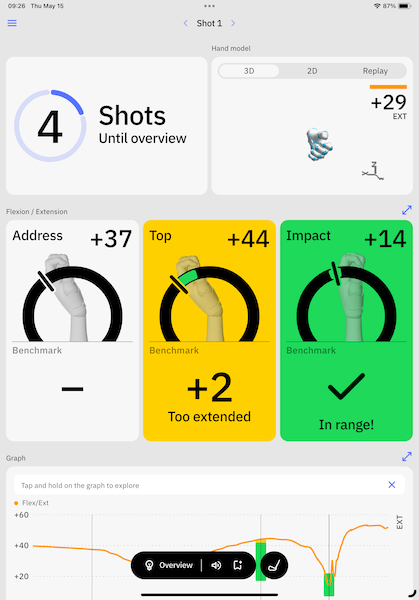
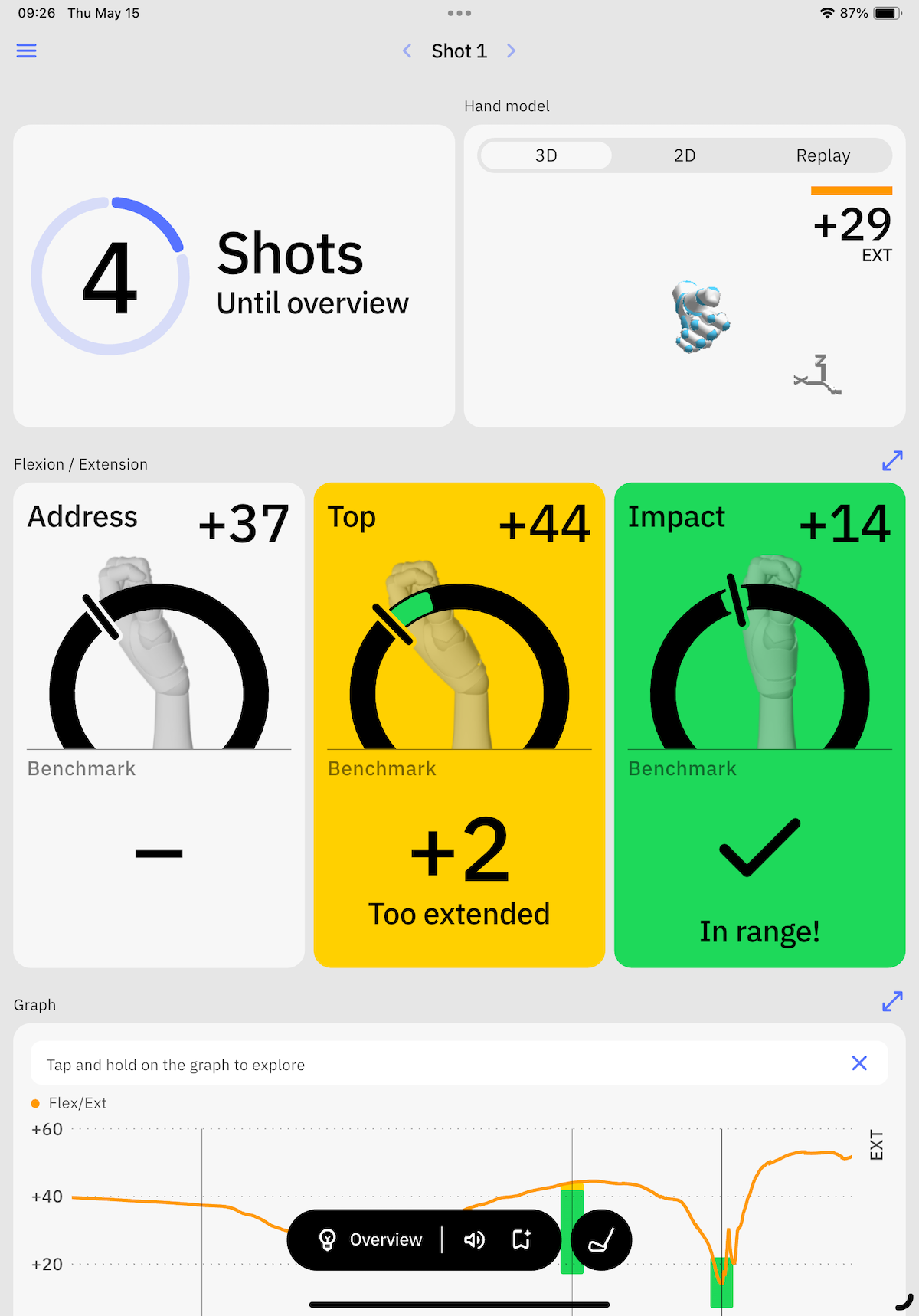
The numbers you need will largely be wrist angles at the address, the top of the backswing, and impact.
What does the HackMotion do?
HackMotion records three key measurements for you:
Lead wrist extension and flexion.
Lead wrist radial and ulnar deviation.
Lead wrist (or forearm) rotation.
Once you record these measurements with HackMotion, the device will tell you whether or not you are in range.
The bottom line: if you are not in range, you are losing distance, consistency, and ball flight control.
Why Consider the HackMotion?
Jamie’s 2026 Update: First, it’s incredibly user-friendly. (It would have to be for someone like me to stick with it)
It assesses and fixes your swing in real time with immediate feedback, video instruction, drills to fix your specific fault(s), and a progress check post drills.
Of course, you’ll have to put in the work to make the fixes stick.
HackMotion Sensor 4 still takes you from identifying your wrist angle issue to giving you drills that correct it.
You get:
Improved contact
Improved trajectory
Improved distance
Improved direction
Improved consistency
The Hackmotion gives audio and tactile feedback (a light, but distinct, “buzz” on your arm) to groove the right motion, and it stores your sessions so you can track improvement over time.
It’s ideal for golfers trying to improve contact, control the clubface better, or just stop guessing what their wrists are doing.
And since it’s now much more user-friendly, you don’t need to be a swing nerd to get value from it.
Whether you’re just starting out or trying to break 80 (or even 70), it can help you build more consistent, efficient mechanics.
You are serious about improving your ball striking and improving your game. (And your putting if you purchase the Pro model)
It doesn’t matter if you are a 25 handicap or a 5 handicap; Hackmotion will help you become a more consistent ball striker.
In addition to consistency, improving your wrist angles will add more distance and more control of your golf shots.
The main benefits of the HackMotion are:
An understanding of what your wrists are doing in your golf swing
Real-time feedback gives you valuable insight into the position of your clubface angle
Learning a more efficient golf swing
Data you can work with regardless of your handicap
The combination of data and feel coinciding leads to faster improvement
How to Control Your Clubface With HackMotion
The most important benefit of the HackMotion is that it can help you gain control of your clubface.
We know enough about golf to know that the clubface angle at impact controls the ball’s direction.
HackMotion Clubface Control mode makes it easy to understand the correlation between wrist angle and clubface angle. Here’s how to go about this.
Step 1: Record Some Data
Make sure your HackMotion is calibrated and ready for use
Wear it with a glove; it makes it easier to forget it’s even there
Don’t try and do anything different; take your regular swing
Hit at least 10 shots
Step 2: Review The Data
HackMotion will record data for the entire swing, but the top of the backswing and impact numbers are the most important.
Most commonly, amateur golfers have a lead wrist that is too extended at the top of their backswing.
Step 3: Set The Ranges
Review the data and analysis that HackMotion gives you about your wrist position.
Check the top of the backswing and impact.
You should fix the top of the backswing first, as this will make fixing the impact that much easier.
Set the ranges for the audio feedback mode.
Step 4: Use Audio Feedback Mode To Improve
Once you have the ranges set, take controlled practice swings, making sure your wrist angles do not go outside the recommended range.
Try taking 10 to 15 swings with audio feedback to get the feeling down.
Now, hit one or two shots.
Repeat this process until you start to feel what the proper wrist positions are throughout your swing.
What To Look For When Working With HackMotion
HackMotion has posted dozens of videos explaining how to use its product. However, I thought I would give you a brief rundown of what you will notice about patterns and proper movements in the golf swing.
First, make sure you realize there is no perfect wrist angle. HackMotion is not going to tell you an exact number. Instead, they give a range. Let’s face it: we are all humans, our bodies are all different, and the wrist angles can’t be exact.
Here are the key takeaways from HackMotion:
Your grip position and grip consistency have an impact on the clubface angle.
The lead wrist should be flat, flexed, or just slightly extended at the top of your backswing; golfers who extend it from setup to the top of the backswing are in a bad position.
Great players start their downswing by immediately removing the extension from the lead wrist (aka squaring the clubface)
At impact, great players have their lead wrists slightly flexed; poor players have their lead wrists very extended.
I can get into A LOT more detail about these numbers and patterns, but these are the most important aspects you will find when working with HackMotion.
Again, focus more on the patterns than on the exact amount of extension and flexion.
My Experience with the HackMotion & How I’ve Been Using It
I’ve had the HackMotion for about six months, and it has taught me things about wrist motion and action that I didn’t previously understand.
I’ll have to be honest; I think you need a little (maybe a lot of) golf geek in you for this to be a good investment. (I’m also a math geek, so the combination of the two was perfect for what HackMotion offers)
I love using HackMotion as a tool for the full swing and making connections between certain feels and certain positions in my swing. Real-time feedback is hard to beat.
I’m surprised by how lightweight and unobtrusive the HackMotion is. I find it works much better with a glove on than without. Either way, make sure you calibrate the device correctly and you’re good to go.
In addition, I noticed very few irregularities in the results I got, which made me feel a bit better about HackMotion’s overall accuracy. I’m a relatively consistent ball striker, but when I’m not consistent, it’s because I get a little too extended at the top of the swing.
My favorite way to work with HackMotion is to record data for a few minutes, analyze it, and then take it off and hit some shots without getting too consumed with numbers.
Don’t get me wrong, the numbers are helpful and give me insights, but then I want to see what I’ll do on the course.
One word of caution here is that I even had to do a little studying on proper wrist angles and data to fully understand what the HackMotion can do. If you want to get the most out of this swing analyzer, you have to dive a little deeper and invest the time. (Lucky for us, HackMotion provides a lot of information on this)
HackMotion does offer a putting stability mode that is quite helpful if you are working on consistency in your putting stroke. But, you’ll find the most benefit in full-swing training.
Jamie’s Experience with the HackMotion
I’ve used Hackmotion for years now. I started with the original, which I thought had a bad glitchy app experience. (Brittany got along better with it)
Then, I got Sensor 3 – a MASSIVE improvement in app experience. Completely intuitive. Excellent tutorials. Perfect functionality.
Now, I’ve got Sensor 4 – sleeker, more memory and power. Same exceptional experience. Now fits under your glove (or over), vs the original glove clip.
I’m casting right now. Not a ton, but more than Hackmotion likes – and it’s a devil to fix. I can do it in slow motion, but I need a WHOLE bunch of reps.
Thing is, the app acts like a coach reacting to what you’re doing in real time and giving you fixes and instruction and drills right there on the spot.
I like it and it’s a stand out for doing exactly what it says it’s going to do.
Who’s it For?
Jamie’s 2026 Update: HackMotion is intuitive, easy to use and fast – giving you feedback and training in realtime.
It’s useful for golfers across all skill levels — as long as you’re willing to practice with it.
Low handicap: (Yes) Great for refining clubface control and cleaning up your impact position. If you’re working on shallow vs steep or controlling dynamic loft, HackMotion gives you instant feedback on your wrist angles and helps you train better feels.
Mid-handicap: (Yes) This is probably the sweet spot. If you struggle with consistency, lose shots from poor contact, or tend to “flip” at impact — HackMotion will show you exactly what’s happening and walk you through how to fix it.
High handicap: (Yes) It’s much more beginner-friendly now. You don’t need to be a swing geek to get value from it. In fact, using this early on can help you build a better swing foundation before bad habits settle in.
Coaches & teachers: (Absolutely) The app’s visual cues and feedback system make it easier to explain complex swing mechanics. It’s also great for helping students feel the difference between what they think they’re doing and what they’re actually doing.
HackMotion can work for any handicap golfer. However, it will appeal more to golfers who like data, stats, and analytics.
Although HackMotion can teach you to “feel” what you must do with your wrists, it’s not a wrist brace or a swing jacket. It’s a measuring device.
Low handicap: (Yes) The ability of the HackMotion to pick up minute differences from one swing to the next can help you fine-tune impact and see firsthand the importance of that flexed lead wrist.
Mid-handicap: (Yes) Mid-handicapper golfers tend to lack knowledge about golf swing mechanics and theories; the HackMotion will have you casually talking about radial and ulnar deviation in no time. Use this tool to expand your knowledge and improve your game simultaneously.
High handicap: (Maybe to No) HackMotion is one of the best golf slice fixing tools on the market, but you do have to invest some time into learning how to use it. If you are a higher handicapper on a mission, go for it.
Final Verdict
Jamie’s 2026 Update: The latest version of HackMotion is a minor improvement over an already great piece of equipment.
I think it speaks well of Hackmotion that they’re trying to deliver a better experience for the user while keeping everything that works.
The original was a great tool for coaches and gear heads.
With Sensor 3, and now with Sensor 4, it’s a legit training aid for any golfer who wants better ball striking.
It’s intuitive. It’s fast to set up. It walks you through diagnosing your swing fault, gives you drills to fix it, and provides audio and haptic feedback while you work.
If you’re serious about improving your swing — especially clubface control and impact — HackMotion is worth the money.
It’s the most comprehensive product like it on the market and it delivers in a way regular golfers can benefit from.
I like HackMotion a lot. I’ve learned things about the golf swing that I had never known before. So many people like to say, “Leave the wrists out of it,” but the reality of this is just not true.
Instead, HackMotion went all in on one of the most challenging concepts in the game to understand, and they created a way for all golfers to finally wrap their minds around what the wrist actually does in the golf swing.
Take advantage of this opportunity and technology to take your game to the next level.
Thanks for checking out our HackMotion review, and let us know how the HackMotion works for you.
Highly Recommended
HackMotion Swing Analyzer & Trainer
★★★★★★★★★★4.5
Pros
✓Intuitive & Easy to use
✓Immediately diagnoses faults & guides you through drills to fix them


 Written ByBrittany Olizarowicz